
Key Takeaways
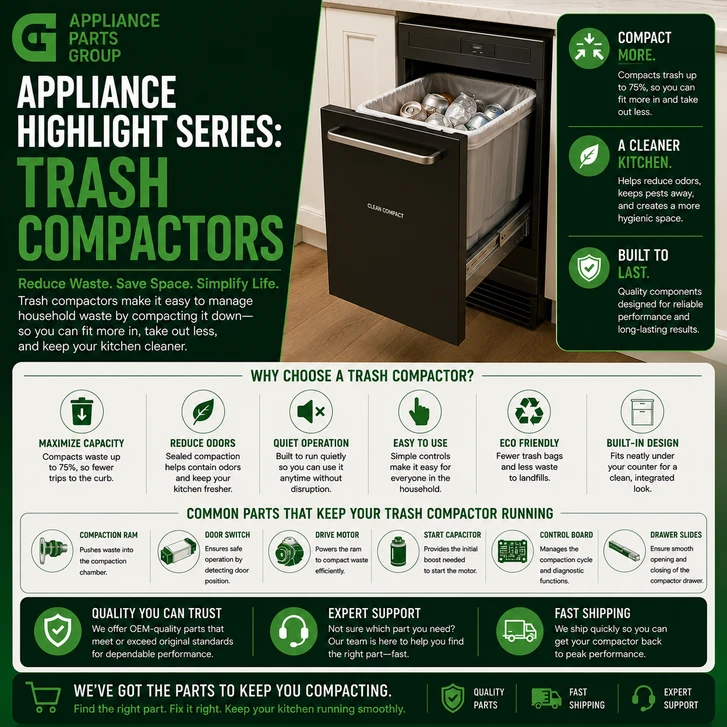
- Trash compactors use a motor-driven ram to compress household waste into a smaller volume.
- Common problems include a compactor that will not start, a ram that will not move, unusual noises, and a drawer that will not open or close correctly.
- Important trash compactor components include the drive motor, ram, gears, switches, drawer tracks, chains, and sprockets.
- Regular cleaning and proper loading can help reduce wear on the drive system and drawer components.
- When a repair is needed, using the appliance model number is one of the best ways to identify the correct OEM replacement part.
Introduction
Trash compactors are one of the more specialized appliances found in residential kitchens. They are less common than refrigerators, dishwashers, ranges, or garbage disposals, but they can still be extremely useful in homes where reducing the volume of household waste is important.
The basic function of a trash compactor is simple. Household waste is placed into a reinforced bag inside a pull-out drawer. When the compaction cycle starts, a motor-powered ram moves downward and compresses the trash. The ram then reverses direction and returns to the top of the cabinet so additional waste can be added.
Although the operation may look simple from the outside, a trash compactor relies on a combination of electrical and mechanical parts. Motors, switches, drive gears, chains, sprockets, drawer hardware, and control components all have to work together for the appliance to complete a normal cycle.
Because trash compactors are not found in every kitchen, many homeowners are less familiar with their operation and repair compared with other major appliances. This Appliance Highlight Series article explains how trash compactors work, common problems to watch for, troubleshooting steps, maintenance recommendations, and the OEM replacement parts that may be needed when something fails.
What Is a Trash Compactor?
A residential trash compactor is an appliance designed to reduce the volume of ordinary household garbage. Most models are built into kitchen cabinetry or installed as narrow freestanding units. A pull-out drawer holds a reinforced trash bag or container, while a motorized ram assembly is positioned above it.
When the appliance is activated, the ram moves downward and presses the garbage toward the bottom of the drawer. This reduces the amount of space occupied by the waste. Once the ram reaches the proper point in its travel, the motor reverses and raises the ram back into its resting position.
A trash compactor does not eliminate waste and does not replace recycling. Its purpose is simply to make ordinary household trash denser and more manageable.
How Does a Trash Compactor Work?
Most trash compactors follow a similar operating sequence, although the exact design can vary by brand and model.
First, the drawer must be fully closed. A drawer switch or safety interlock confirms that the appliance is in the proper position for operation. This prevents the compactor from running while the drawer is open.
Once the start control is activated, power is sent to the drive motor. The motor turns a drive mechanism that may include gears, sprockets, chains, belts, or threaded power screws. These components transfer the motor's rotation into vertical movement of the ram.
The ram travels downward and compresses the waste. When it reaches the appropriate point, a directional switch, limit switch, or other control component signals the motor to reverse. The ram then travels upward until it reaches its home position, where the motor stops.
Some models also include additional features such as odor-control systems, charcoal filters, fan assemblies, locking controls, foot pedals, or hold settings that maintain pressure on the waste for a longer period of time.
Common Trash Compactor Problems
Trash Compactor Will Not Start
If a trash compactor does not respond when the start control is activated, the first thing to check is the electrical power supply. Make sure the appliance is plugged in and verify that the household circuit breaker has not tripped.
If power is available, check that the drawer is completely closed. A failed or misaligned drawer switch can prevent the appliance from starting even when everything else appears normal.
Other possible causes include a defective start switch, key switch, motor, control component, or wiring connection.
Trash Compactor Motor Runs but the Ram Does Not Move
If the motor can be heard running but the ram does not move, the problem may be mechanical rather than electrical.
Drive gears can wear or strip, chains can become loose, and sprockets can crack or become damaged. When one of these parts fails, the motor may continue turning without transferring power to the ram.
Clicking or grinding noises during operation can be an additional sign that a drive component is worn.
Trash Compactor Ram Is Stuck Down
A ram that remains in the lower position can prevent the drawer from opening. This can be caused by a failed directional switch, a jammed drive mechanism, worn gears, a motor problem, or a control failure that prevents the motor from reversing.
Do not force the drawer open. The ram and drive mechanism may still be under significant mechanical pressure. Disconnect the appliance from electrical power before attempting service.
Trash Compactor Makes Grinding or Clicking Noises
Trash compactors naturally make mechanical sounds, but new or unusually loud grinding, clicking, popping, or banging noises should be investigated.
Possible causes include worn drive gears, damaged sprockets, a loose chain, misalignment, or an obstruction in the ram mechanism.
Continuing to operate the compactor with a damaged drive part may place additional strain on the motor and other components.
Drawer Will Not Open or Close Properly
The trash compactor drawer moves on rollers, tracks, glides, or rails. Food residue, damaged rollers, bent tracks, an overfilled bag, or an incorrectly positioned ram can interfere with drawer movement.
A drawer problem can also cause the compactor to appear electrically dead. If the drawer does not close far enough to engage the safety switch, the motor will not start.
Ram Moves Unevenly
An uneven or tilted ram can indicate wear or damage in the drive mechanism. Some models use multiple drive components that must remain synchronized. If one side begins to slip or bind, the ram may move unevenly.
Stop using the appliance if the ram becomes noticeably crooked or begins making abnormal noises. Continued operation can cause additional damage.
Step-by-Step Troubleshooting
- Check the power supply. Make sure the trash compactor is plugged in and verify that the circuit breaker has not tripped.
- Close the drawer completely. Push the drawer into its normal operating position so the safety interlock can engage.
- Check the controls. Make sure the start switch, key switch, foot control, or selector is positioned correctly.
- Listen to the appliance. A completely silent compactor may have a power or switch issue. A running motor with no ram movement may indicate a drive-system problem.
- Check for overloading. An excessively full bag or improperly positioned waste may interfere with ram movement.
- Inspect for visible obstructions. Disconnect power and check accessible areas for debris or objects interfering with the drawer or ram.
- Inspect drawer tracks and rollers. Make sure the drawer moves smoothly and reaches the fully closed position.
- Inspect the drive mechanism. Worn gears, loose chains, damaged sprockets, or broken drive components can prevent the ram from moving properly.
- Inspect switch actuators. A drawer or directional switch may be functional but not physically engaging because of misalignment.
- Locate the model number. Before ordering replacement parts, use the full appliance model number to verify compatibility.
Always disconnect electrical power before servicing internal components. Trash compactors contain moving mechanisms capable of applying considerable force, so repairs involving the ram or drive system should be approached carefully.
Common Parts That May Need Replacement
Drive Motor
The drive motor provides the power required to move the compactor ram. A failing motor may hum, stop intermittently, overheat, or fail to run at all.
Before replacing the motor, inspect the drive system for binding or damaged mechanical components. A jammed gear or drive mechanism can prevent a good motor from turning normally.
Drive Gears
Drive gears transfer power from the motor to the ram mechanism. Gear teeth can wear, crack, or strip over time.
A damaged gear may allow the motor to run while the ram remains stationary. Clicking or grinding noises can also indicate gear wear.
Drive Chain
Some trash compactors use a chain as part of the drive system. A stretched, loose, or damaged chain can create noise, uneven movement, or complete loss of ram travel.
Sprockets
Sprockets work with the drive chain to transfer movement through the compactor mechanism. Worn or broken sprockets can allow the chain to slip and can prevent proper ram movement.
Drawer or Door Switch
The drawer switch is a safety component that confirms the drawer is closed. If the switch fails or the actuator becomes damaged, the compactor may not start.
Directional or Limit Switch
Directional and limit switches help control the ram's movement. They may signal when the motor should reverse direction or stop.
A failed switch can leave the ram in the wrong position or prevent the cycle from completing properly.
Start Switch or Key Switch
Depending on the model, a trash compactor may use a push button, rotary control, foot pedal, or key-operated switch to start the cycle.
Worn electrical contacts or mechanical damage can prevent the start signal from reaching the motor circuit.
Drawer Rollers, Tracks, and Glides
The drawer must move smoothly and close completely. Worn rollers, bent tracks, or damaged glides can make the drawer difficult to operate and may prevent the safety switch from engaging.
Trash Compactor Bags and Retainers
Trash compactor bags are consumable items, but using the correct style and size is important. A poorly fitting bag can interfere with the drawer, retaining system, or ram.
When replacement components are needed, an OEM part matched to the exact appliance model number is designed around the original mounting points, electrical connections, dimensions, and operating specifications.
How to Find the Correct Trash Compactor Part
The appliance model number is one of the most important pieces of information when searching for replacement parts.
The model tag may be located around the drawer opening, along the cabinet frame, behind the drawer, or in another manufacturer-designated location.
Once the complete model number is located, it can be used to identify compatible motors, gears, switches, chains, rollers, and other components.
Visual matching alone is not always reliable. Two parts may look nearly identical while having different electrical ratings, mounting holes, connector styles, shaft sizes, or operating characteristics.
If the original component has already been removed, a number printed or stamped on the part may provide an additional reference. However, matching through the appliance model number is generally the best starting point.
Preventative Maintenance Tips
- Clean the drawer regularly. Remove food residue, spills, and debris from the drawer, tracks, and surrounding surfaces.
- Use the recommended compactor bags. Correctly sized bags are less likely to interfere with normal drawer or ram movement.
- Avoid overfilling the drawer. Leave enough space for the ram to begin its downward travel.
- Distribute trash evenly. Avoid creating an unusually hard or uneven pile directly under one section of the ram.
- Investigate unusual noises. New grinding or clicking sounds can be early signs of drive-system wear.
- Keep the drawer mechanism clean. Small debris can interfere with rollers, tracks, switches, and glides.
- Do not force a stuck drawer. A ram that has not returned to the top may be preventing the drawer from opening.
- Replace worn parts promptly. A damaged gear, roller, chain, or switch can place additional stress on other components.
What Should Not Go in a Trash Compactor?
Always follow the operating instructions for the specific trash compactor model. Residential trash compactors are generally intended for ordinary household waste rather than hazardous or highly rigid materials.
Flammable substances, pressurized containers, aerosol cans, chemicals, and other hazardous materials should not be compacted. Large pieces of glass or exceptionally hard objects can also create a safety hazard or damage the bag and drive system.
Proper loading can help protect both the appliance and the user.
Are Trash Compactors Still Useful?
Trash compactors are not as common in modern kitchens as many other major appliances, but they still serve a useful purpose for certain households.
Homes that generate a significant amount of non-recyclable waste may benefit from reducing trash volume, particularly when outdoor garbage storage is limited or collection occurs less frequently.
They can also make sense in kitchens that were originally designed around a built-in compactor opening. Repairing an existing compactor may allow the homeowner to maintain the original cabinet layout without modifying the surrounding space.
A failed switch, gear, motor, roller, or drive component does not always mean the entire appliance needs to be replaced. Many trash compactors can continue operating after the failed component is identified and replaced.
Frequently Asked Questions
What does a trash compactor do?
A trash compactor uses a motor-driven ram to compress ordinary household waste into a smaller volume inside a reinforced bag or drawer.
Why will my trash compactor not start?
Possible causes include a loss of electrical power, an open or misaligned drawer, a failed safety switch, a defective start switch, wiring problems, or a faulty drive motor.
Why is the motor running but the trash compactor ram is not moving?
If the motor runs but the ram does not move, the problem may involve stripped gears, a loose chain, damaged sprockets, or another failure in the drive mechanism.
Why is my trash compactor ram stuck down?
A ram can remain in the down position because of a failed directional switch, damaged drive component, obstruction, motor problem, or control issue that prevents the system from reversing.
Why is my trash compactor making a grinding noise?
Grinding can be caused by worn drive gears, damaged sprockets, chain problems, misalignment, or an obstruction in the ram mechanism.
Can a trash compactor be repaired?
Yes. Many trash compactor problems can be repaired by replacing individual components such as switches, gears, motors, drive parts, drawer rollers, or controls.
Where is the model number on a trash compactor?
The model tag is commonly located around the drawer opening, on the cabinet frame, behind the drawer, or in another location specified by the manufacturer.
Do trash compactors require special bags?
Many models use reinforced bags designed for a particular drawer size or retaining system. Using the recommended style can help prevent fit and operating problems.
Can I put glass in a trash compactor?
Follow the manufacturer's instructions for your specific model. Large, sharp, or breakable objects can damage the bag or create a safety hazard.
How often should a trash compactor be cleaned?
Clean spills and residue whenever they occur, and periodically clean the drawer, tracks, rollers, and accessible interior surfaces according to the manufacturer's instructions.
What parts commonly wear out in a trash compactor?
Common service items include drive gears, chains, sprockets, switches, motors, drawer rollers, tracks, and control components, although the exact design varies by model.
Should I continue using a trash compactor that is making a new noise?
It is generally better to stop and inspect the appliance. Continued operation with a worn or damaged drive component can place additional stress on related parts.
Entities and Terms
- Trash compactor
- Compactor ram
- Drive motor
- Drive gear
- Drive chain
- Sprocket
- Drawer switch
- Safety interlock
- Directional switch
- Limit switch
- Start switch
- Key switch
- Drawer roller
- Drawer track
- Compactor bag
- OEM replacement parts
Final Thoughts
Trash compactors combine a simple purpose with a relatively complex mechanical system. Motors, gears, switches, chains, sprockets, safety interlocks, and drawer components must all work together for the appliance to complete a normal compaction cycle.
When a compactor stops working, the symptoms can provide useful clues. A completely silent appliance may point toward a power or switch problem, while a running motor with no ram movement may indicate trouble in the drive system. Grinding noises, drawer problems, and incomplete ram travel can help narrow the diagnosis even further.
Before ordering replacement components, locate the complete appliance model number and use it to confirm compatibility. Choosing the correct OEM replacement part can help restore proper operation and extend the useful life of the trash compactor.
This article was written by an AI program as part of a beta test by Appliance Parts Group to explore how artificial intelligence can help inform and educate our customers.
Our goal is to use AI tools to provide clear, reliable information so you can make confident, well-informed purchasing decisions.