
Key Takeaways
- Smart refrigerators combine traditional refrigeration systems with Wi-Fi connectivity, advanced sensors, electronic controls, touchscreens, cameras, apps, and other connected features.
- Despite their advanced technology, smart refrigerators still depend on familiar components such as evaporator fans, condenser fans, thermistors, water inlet valves, ice makers, door gaskets, and control boards.
- A smart feature or error notification can provide useful diagnostic information, but it does not automatically identify which component has failed.
- Accurate model-number identification is especially important when ordering OEM parts for smart refrigerators because control boards, displays, sensors, and connectivity components may differ between similar models and production revisions.
- Routine refrigerator maintenance—including cleaning, inspecting door seals, replacing water filters when required, and maintaining proper airflow—remains important even when an appliance can monitor some of its own operating conditions.
Introduction
For decades, the refrigerator had a relatively straightforward job: keep fresh food cold and frozen food frozen. Today's smart refrigerators can do considerably more.
Depending on the model, a connected refrigerator may communicate with a smartphone app, provide door-open notifications, monitor operating conditions, display maintenance reminders, track energy use, offer touchscreen controls, communicate diagnostic information, or integrate with other devices in a connected home. Some of the newest models take the concept further with internal cameras and artificial-intelligence-assisted food management.
These features can make the refrigerator one of the most technologically advanced appliances in the kitchen. However, there is an important point for homeowners to remember: underneath all that technology is still a refrigeration system.
A smart refrigerator still needs to move air, regulate temperatures, remove heat, defrost its evaporator, seal its doors, make ice, dispense water, and control electrical components. Fans can wear out. Sensors can malfunction. Water valves can develop problems. Ice makers can fail. Door gaskets can become damaged. Electronic control boards can experience faults.
The difference is that a smart refrigerator adds another layer of electronics and connectivity on top of those familiar systems. Understanding both layers can make troubleshooting and finding the correct OEM replacement parts much easier.
What Is a Smart Refrigerator?
A smart refrigerator is generally a refrigerator that incorporates connected electronic features beyond standard digital temperature controls. Wi-Fi connectivity is one of the most common characteristics, allowing compatible models to communicate with manufacturer apps and other connected-home systems.
The exact capabilities vary significantly by manufacturer and model. A refrigerator does not need a giant touchscreen or an internal camera to qualify as a connected appliance.
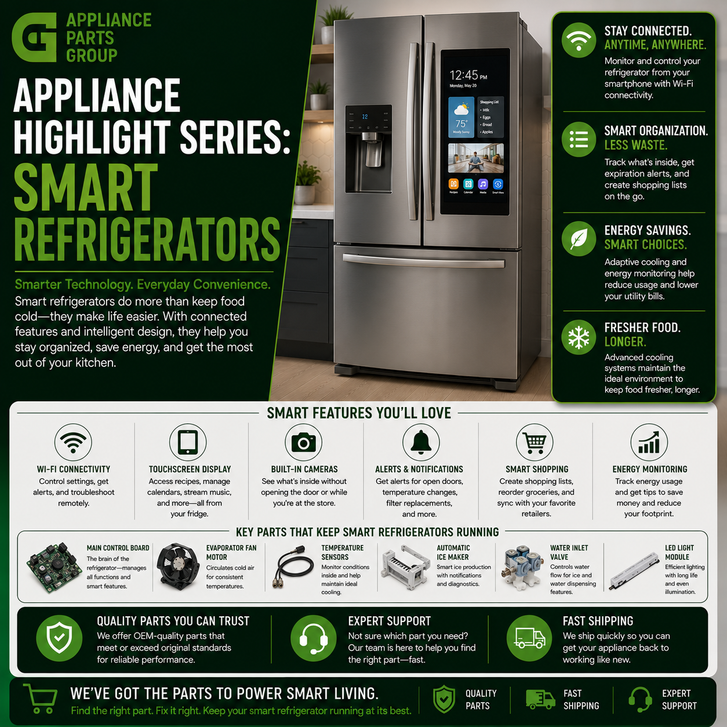
Depending on the refrigerator, smart functionality may include:
- Wi-Fi connectivity
- Smartphone app integration
- Remote temperature monitoring or adjustment
- Door-open alerts
- Maintenance notifications
- Water-filter reminders
- Energy monitoring
- Diagnostic information
- Touchscreen interfaces
- Internal cameras
- Food-management features
- Voice-assistant or smart-home integration
- Specialized temperature-zone controls
Current smart-refrigerator technology demonstrates how quickly this category is evolving. Select refrigerators now use internal cameras and software to recognize certain foods entering and leaving the refrigerator, while connected maintenance platforms can provide appliance notifications and troubleshooting information.
Features vary considerably, however, so homeowners should always consult the documentation for their exact refrigerator model rather than assuming that every smart refrigerator has the same capabilities.
How Smart Refrigerators Work
The easiest way to understand a smart refrigerator is to separate it into two layers: the refrigeration system and the smart-control system.
The Refrigeration Layer
The refrigeration layer performs the fundamental work of keeping food cold. Depending on the design, components can include the compressor, condenser, evaporator, fans, thermistors, defrost components, dampers, and electronic controls.
Temperature sensors provide information to the refrigerator's controls. The controls use that information to determine when cooling or other functions should operate.
If this portion of the appliance develops a problem, the refrigerator may experience familiar symptoms such as:
- Refrigerator not cooling
- Freezer too warm
- Food freezing in the fresh-food compartment
- Excessive frost
- Unusual fan noise
- Compressor cycling problems
The Smart Layer
The smart layer adds connectivity and advanced electronic interaction. Depending on the design, this may involve a Wi-Fi module, main control board, display board, touchscreen, cameras, additional sensors, and software.
This creates an important distinction when diagnosing a problem.
A refrigerator can have a connectivity problem while its refrigeration system continues cooling normally. Conversely, a refrigerator may remain connected to its app while experiencing an actual cooling problem.
In other words, a refrigerator being "smart" does not mean every failure is an internet, software, or control-board problem.
Common Smart Refrigerator Features
Remote Monitoring and Notifications
One of the most practical benefits of connected refrigeration is the ability to receive information without standing in front of the appliance.
Depending on the manufacturer and model, homeowners may receive alerts related to an open refrigerator door, maintenance needs, filter replacement, or operating conditions.
These notifications can help homeowners notice a problem earlier, but they should be treated as diagnostic clues rather than automatic confirmation that a particular replacement part is required.
Smart Diagnostics
Connected appliances can provide information that was once available primarily through service diagnostics. Some systems can report error conditions, maintenance information, or troubleshooting guidance through an app.
This can narrow the search considerably. If a refrigerator reports an abnormal temperature condition, for example, a homeowner can begin investigating cooling and airflow rather than starting completely from scratch.
However, diagnostic information must still be interpreted correctly. Several different components can sometimes create similar symptoms.
Touchscreen Controls
Large electronic displays have transformed the refrigerator door into another household interface. Depending on the refrigerator, a touchscreen may provide appliance settings, calendars, recipes, connected-home controls, entertainment features, or food-management functions.
From a repair perspective, this also means that some refrigerators contain sophisticated user-interface assemblies in addition to their main electronic control systems.
Internal Cameras and Food Management
Some newer smart refrigerators use internal cameras to help users view or track refrigerator contents. Select models also use artificial-intelligence-assisted systems to recognize certain foods.
These features represent an emerging area of appliance technology because the refrigerator is moving beyond simply storing food and toward helping households manage it.
Energy Management
Connected refrigerators may also provide energy information or operating modes designed around energy management. Smart-grid concepts have existed in connected refrigeration for years, with certain appliances designed to adjust selected functions based on energy-demand conditions.
The exact capabilities depend on the refrigerator and the services available to the homeowner.
Common Smart Refrigerator Problems
Refrigerator Is Connected but Not Cooling
If the app works but the refrigerator is warm, begin by treating the problem as a refrigeration issue rather than a Wi-Fi problem.
Potential areas to investigate include airflow, evaporator or condenser fans, thermistors, defrost components, controls, door sealing, and the sealed refrigeration system.
Refrigerator Cools but Will Not Connect
If temperatures are normal but smart functions are unavailable, the problem may be isolated to connectivity.
Check the home's network, refrigerator Wi-Fi settings, manufacturer app, account status, and setup instructions before assuming an internal electronic component has failed.
Connectivity requirements vary by model. Some connected appliances, for example, have specific wireless-network requirements that must be satisfied before setup can be completed.
Touchscreen or Display Problems
A blank, frozen, flickering, or unresponsive interface can potentially involve the user-interface assembly, power supply, wiring, communication between electronic boards, or software.
Because electronic assemblies can be expensive and model-specific, avoid replacing a display solely because the screen appears abnormal. Follow manufacturer troubleshooting procedures first.
Incorrect Temperature Readings
A smart refrigerator relies heavily on sensor information. Thermistors and other temperature sensors allow electronic controls to determine actual compartment conditions.
A sensor problem can therefore affect temperature regulation even when the compressor and fans are physically capable of operating.
Ice Maker or Water Dispenser Problems
Smart technology does not eliminate traditional refrigerator water-system problems. A connected refrigerator can still experience a clogged or incorrectly installed filter, frozen fill tube, faulty water inlet valve, dispenser switch problem, ice maker failure, or related control issue.
Start diagnosis with the actual symptom rather than assuming the smart electronics are responsible.
Step-by-Step Troubleshooting
- Identify the exact model number. Find the refrigerator's model and serial tag and record the complete model number, including letters, numbers, dashes, and suffixes. This is essential when researching documentation or ordering replacement parts.
- Determine whether the problem affects refrigeration or only smart functions. Check whether the refrigerator and freezer are maintaining proper temperatures. If cooling is normal but the app is offline, concentrate on connectivity first.
- Check the refrigerator controls. Verify that the appliance is powered, cooling is enabled, and temperature settings have not accidentally been changed.
- Check network connectivity. If only connected features are affected, confirm that the home internet connection and router are working. Follow the refrigerator manufacturer's instructions for reconnecting the appliance rather than repeatedly resetting unrelated refrigerator components.
- Review alerts and error codes. Record any code exactly as displayed. Consult documentation for the specific model because similar-looking codes can have different meanings across manufacturers.
- Inspect airflow. Make sure interior vents are not blocked by food containers. Listen for fan operation where appropriate and inspect accessible areas for unusual frost accumulation.
- Inspect the door seals. Look for torn, loose, dirty, or deformed gaskets that may allow warm, humid air into the refrigerator.
- Check the water and ice system separately. If cooling works but water or ice does not, investigate the filter, water supply, valves, ice maker, dispenser, and related components rather than assuming the entire refrigerator has an electronic problem.
- Use built-in diagnostics when appropriate. Some smart refrigerators offer service information or diagnostic functions. Follow the manufacturer's procedure for the exact model.
- Confirm the replacement part before ordering. Use the full refrigerator model number and appropriate parts documentation to verify compatibility. This is particularly important for control boards, displays, sensors, and connectivity modules.
Safety note: Disconnect electrical power before accessing internal electrical or mechanical components unless an authorized diagnostic procedure specifically requires power. Refrigerator sealed-system work and repairs involving refrigerant should be performed by appropriately qualified service professionals.
Common Parts That May Need Replacement
Temperature Sensors and Thermistors
Thermistors monitor temperature and provide information to the electronic controls. A faulty sensor can contribute to incorrect temperature regulation or diagnostic errors.
Electronic Control Boards
Modern refrigerators may use one or several electronic boards to manage cooling, defrosting, fans, ice production, user-interface functions, and other operations.
Smart models can make control-board identification especially important because visually similar boards may have different programming, connectors, revisions, or model applications.
User Interface and Display Assemblies
The interface may range from a simple digital display to a sophisticated touchscreen. If an interface develops a confirmed hardware fault, the correct OEM assembly should be identified using the complete model information.
Wi-Fi and Connectivity Modules
Some refrigerator designs use dedicated connectivity hardware. Before replacing such a component, rule out router configuration, setup, account, app, and software issues according to manufacturer instructions.
Evaporator and Condenser Fans
Fans remain essential even in highly connected refrigerators. The evaporator fan helps circulate cold air, while a condenser fan on applicable designs helps remove heat from the condenser and compressor area.
Water Inlet Valves
Water inlet valves control water flow to refrigerator water and ice systems. Valve problems can contribute to low water flow, filling problems, or ice-production issues.
Ice Maker Assemblies
Ice makers have become increasingly sophisticated, but they still depend on proper temperatures, water supply, sensors, mechanical components, and controls.
Door Gaskets
A door gasket may not be a "smart" component, but it remains extremely important. A damaged seal allows warm and humid air to enter, potentially increasing compressor runtime and contributing to moisture or frost problems.
Defrost Components
Automatic-defrost refrigerators use components that prevent excessive frost from restricting evaporator airflow. Depending on the model, these can include heaters, sensors, thermostats, and electronic controls.
When purchasing replacement parts for a smart refrigerator, use the complete appliance model number to identify the appropriate OEM component. Connected appliances can have multiple electronic revisions, and appearance alone is not a reliable compatibility check.
Why Model Numbers Matter Even More With Smart Refrigerators
Model-number accuracy has always mattered in appliance repair, but smart appliances make it particularly important.
Two refrigerators from the same product family may look almost identical from the outside while using different control boards, sensors, displays, ice makers, or connectivity components.
Manufacturers may also update components during a product's production life. A replacement board can look different from the original while still being the manufacturer's correct superseding part. Conversely, two boards can look nearly identical and still be incompatible.
For that reason, do not order an electronic component simply by comparing photographs.
Start with the refrigerator model number. When required by the manufacturer's parts information, also verify serial-number ranges, production revisions, and official part substitutions.
Preventative Maintenance Tips
A refrigerator becoming smarter does not make traditional maintenance obsolete. In many cases, basic maintenance is still one of the best ways to support reliable operation.
- Keep air vents clear. Avoid packing food tightly against interior vents where it can restrict circulation.
- Inspect door gaskets. Clean seals periodically and check for tears, looseness, or deformation.
- Replace water filters as recommended. Follow the refrigerator manufacturer's replacement interval and instructions for the correct filter.
- Keep accessible condenser areas clean. If your model has condenser surfaces that require homeowner cleaning, follow its use-and-care instructions.
- Pay attention to notifications. A maintenance alert is useful only when it is reviewed and addressed.
- Keep connected features properly configured. If you rely on remote notifications, verify that the refrigerator remains connected to the appropriate network and manufacturer account.
- Do not ignore unusual sounds. A new grinding, clicking, buzzing, or rattling sound can provide an early indication of a mechanical problem.
- Monitor actual refrigerator temperature. Smart features are convenient, but safe food storage still depends on proper compartment temperatures.
- Use the correct replacement parts. Confirm OEM part compatibility with the exact refrigerator model rather than relying on visual similarity.
The Future of Smart Refrigerator Repair
Smart refrigerators illustrate a larger change occurring throughout the appliance industry. Mechanical and refrigeration systems are increasingly being combined with sensors, software, connectivity, and data.
That can make diagnosis more sophisticated, but it can also provide homeowners and technicians with better information.
A refrigerator capable of reporting operating conditions or maintenance needs may help identify developing problems sooner. Internal sensors can provide more detailed feedback. Connected diagnostic platforms can help guide troubleshooting.
At the same time, repairs increasingly require accurate component identification. Replacing a fan motor or door gasket may remain relatively straightforward, while replacing an electronic module can require careful verification of model compatibility and part revisions.
The fundamental repair principle remains the same: diagnose the symptom first, determine which system is responsible, and identify the correct replacement component before ordering.
Frequently Asked Questions
What makes a refrigerator a smart refrigerator?
A smart refrigerator generally includes connected electronic features such as Wi-Fi, smartphone-app integration, remote monitoring, notifications, advanced displays, diagnostics, cameras, or smart-home integration. Available features vary by model.
Can a smart refrigerator work without Wi-Fi?
In many models, core refrigeration functions can continue without an internet connection, while connected features become unavailable. Always check the documentation for your exact refrigerator because designs and feature requirements vary.
Why is my smart refrigerator not connecting to Wi-Fi?
Possible causes include router configuration, wireless signal issues, incorrect setup, account or app problems, network changes, or a problem with the refrigerator's connectivity system. Follow the manufacturer's connection troubleshooting before replacing hardware.
Can a smart refrigerator diagnose itself?
Some refrigerators can provide error codes, alerts, maintenance information, or diagnostic data. This information can help narrow troubleshooting, but it does not always prove that a particular component needs replacement.
Why is my smart refrigerator connected but not cooling?
Connectivity and refrigeration are separate functions. A connected refrigerator can still develop airflow, sensor, fan, defrost, control, compressor, or sealed-system problems that affect cooling.
What parts commonly fail in smart refrigerators?
Possible replacement components include thermistors, evaporator fans, condenser fans, water inlet valves, ice makers, door gaskets, control boards, user interfaces, and, on applicable models, connectivity components. The actual failure depends on the symptoms and refrigerator design.
Does a touchscreen problem mean the main control board is bad?
Not necessarily. Display problems can involve the interface itself, wiring, power, communication between boards, software, or another electronic component. Proper diagnosis should come before replacing a control board.
Can I replace a smart refrigerator control board myself?
Some experienced DIY appliance owners may be able to replace accessible electronic components after disconnecting power and following the manufacturer's procedures. However, accurate diagnosis and part identification are critical, and professional service may be appropriate when testing or programming is required.
How do I find the correct OEM part for a smart refrigerator?
Locate the complete refrigerator model number and use it to search model-specific parts information. For electronic components, also pay attention to manufacturer substitutions, revisions, and serial-number restrictions when applicable.
Are smart refrigerator parts different from regular refrigerator parts?
Some are. Smart refrigerators still use conventional components such as fans, valves, gaskets, and sensors, but they may also include specialized control boards, displays, cameras, communication modules, and other electronics.
Can smart features help prevent refrigerator problems?
They can help homeowners notice certain conditions earlier. Depending on the model, connected systems may provide maintenance reminders, door alerts, filter notifications, or diagnostic information. Routine physical maintenance is still necessary.
Should I replace a part whenever my refrigerator displays an error code?
No. An error code should be treated as a troubleshooting clue. Wiring, connections, operating conditions, or another component can sometimes trigger a code. Consult the service information for the exact model before ordering replacement parts.
Entities and Terms
- Smart refrigerator
- Wi-Fi module
- Main control board
- User interface
- Touchscreen display
- Temperature sensor
- Thermistor
- Evaporator fan motor
- Condenser fan motor
- Compressor
- Evaporator
- Condenser
- Defrost system
- Water inlet valve
- Ice maker assembly
- Water filter
- Door gasket
- Internal refrigerator camera
- Smart diagnostics
- OEM refrigerator parts
Find OEM Parts for Your Smart Refrigerator
Smart refrigerators may add Wi-Fi, apps, advanced sensors, touchscreens, cameras, and artificial intelligence to the kitchen, but reliable repair still begins with the basics: identify the symptom, locate the exact model number, diagnose the affected system, and confirm the correct replacement component.
Whether the problem involves an evaporator fan, temperature sensor, ice maker, water valve, electronic control board, or another component, Appliance Parts Group can help you search for genuine OEM appliance parts using your refrigerator's model information.
This article was written by an AI program as part of a beta test by Appliance Parts Group to explore how artificial intelligence can help inform and educate our customers.
Our goal is to use AI tools to provide clear, reliable information so you can make confident, well-informed purchasing decisions.