
Key Takeaways
- Appliance control panels provide the interface you use to select cycles, temperatures, settings, and other appliance functions.
- A control panel is not always the same part as the electronic control board; depending on the appliance, the panel may contain or connect to a separate user interface, display board, touchpad, or main control board.
- Unresponsive buttons, blank displays, intermittent operation, damaged touch surfaces, and incorrect responses to commands can indicate a control-panel-related problem, but wiring, power supply, sensors, and control boards should also be considered.
- Before replacing a control panel, verify the appliance model number and diagnose the problem carefully because visually similar panels can have different electronics, connectors, colors, and model compatibility.
- When replacement is necessary, selecting the correct OEM appliance control panel or related electronic component helps ensure proper fit and compatibility with the appliance.
Introduction
Modern appliances rely heavily on electronic controls. Whether you are starting a dishwasher, adjusting a refrigerator temperature, selecting a washing machine cycle, setting an oven timer, or changing a dryer's heat setting, the appliance control panel is often where the interaction begins.
Because the control panel is used so frequently, problems with it can make an otherwise functional appliance difficult or impossible to operate. A button may stop responding. A touch-sensitive control may work only occasionally. The display might become blank, flicker, or show unexpected information. In other cases, the panel itself may crack, peel, or become damaged while the electronics behind it continue to function.
Diagnosing these problems can be complicated because the term control panel can refer to different components depending on the appliance and manufacturer. The visible panel, user interface, touchpad, display board, electronic control board, and main control board may be separate parts, or several of these components may be sold together as one assembly.
Understanding those differences can help you diagnose appliance control problems more accurately and avoid replacing an expensive electronic component unnecessarily.
What Is an Appliance Control Panel?
An appliance control panel is the area of an appliance containing the controls that allow a user to interact with the machine. Depending on the design, it can include push buttons, knobs, switches, touch-sensitive controls, LEDs, digital displays, selector keys, or a touchscreen.
On older appliances, a control panel may primarily house mechanical switches and timers. Newer appliances increasingly use electronic user interfaces connected to one or more control boards.
The exact design varies significantly by appliance. A dishwasher may have a narrow panel along the top or front of its door. A front-load washer may have a large electronic interface containing a display and cycle selector. A refrigerator might use a dispenser-mounted touchscreen or an internal temperature-control interface. Ranges and wall ovens commonly place their displays, touch controls, and electronic components behind a front-mounted panel.
Because these designs differ, identifying exactly which component has failed is an important part of any repair.
Control Panel vs. Control Board: What Is the Difference?
One of the most common sources of confusion during appliance repair is the difference between a control panel and a control board.
The control panel is generally the visible portion of the appliance that the user touches or operates. It may be a structural housing, decorative panel, touchpad, overlay, or complete user-interface assembly.
The electronic control board is typically a circuit board responsible for processing inputs and managing appliance functions. Depending on the design, it may control motors, valves, heating circuits, fans, relays, sensors, and other components.
Some appliances use a separate user-interface board behind the control panel. When you press a button, the user interface detects the input and communicates it to the main control board. The main board then determines what the appliance should do.
Other designs combine the panel, display, and electronics into a single assembly. This is why it is important to look up parts using the appliance's complete model number rather than assuming that a replacement control panel automatically includes its electronics.
Common Signs of an Appliance Control Panel Problem
Control panel failures do not always produce the same symptoms. The behavior depends on which part of the interface or associated electronics has failed.
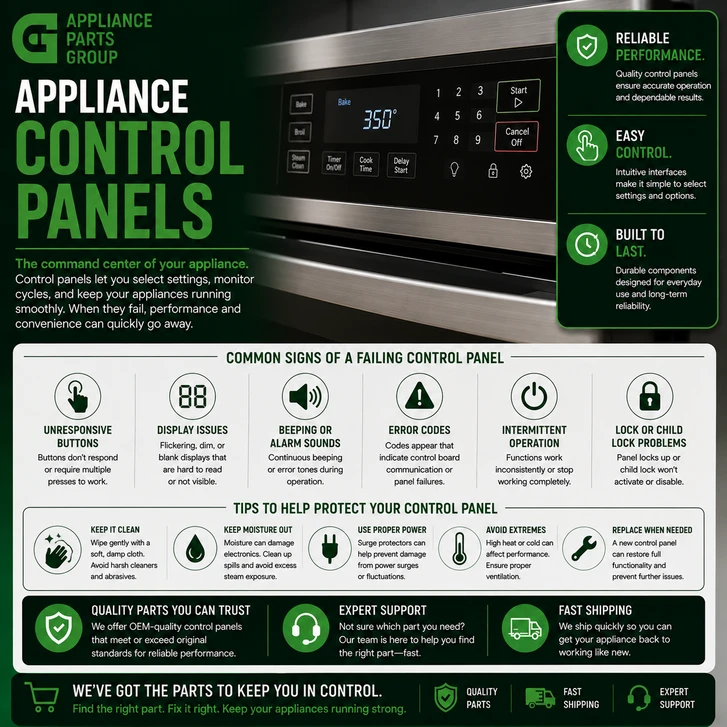
Common symptoms can include:
- One or more buttons do not respond
- Touch controls respond intermittently
- The display is blank even though the appliance has power
- The display flickers or operates intermittently
- Controls activate the wrong function
- The appliance cannot start a selected cycle
- Settings cannot be changed
- Indicator lights fail to illuminate correctly
- The control panel is cracked, loose, or physically damaged
- A touchpad or overlay is peeling or worn
- The appliance displays an error or fault code related to communication or controls
- Operation returns temporarily after power is disconnected and restored
These symptoms can point toward the control panel or user interface, but they do not prove that the panel itself is defective. A main control board, damaged wiring harness, loose connector, failed power supply, door switch, sensor, or another component can sometimes create similar symptoms.
What Causes Appliance Control Panels to Fail?
Normal Wear
Control panels are among the most frequently touched parts of many appliances. Years of pressing buttons, turning selectors, and using touch controls can eventually wear switches, membranes, overlays, and other interface components.
Moisture and Humidity
Electronic controls and moisture are not a good combination. Dishwashers, washers, refrigerators, and cooking appliances may expose control areas to humidity, condensation, steam, or accidental spills. Moisture entering an electronic assembly can contribute to corrosion or intermittent electrical problems.
Heat
Ranges, ovens, and some other appliances operate in high-temperature environments. Control components are designed with operating conditions in mind, but abnormal heat or prolonged exposure to excessive temperatures can damage electronic components and panel materials.
Electrical Problems
Electronic controls can be affected by electrical faults or abnormal voltage conditions. A failed component elsewhere in the appliance can also affect a control circuit. Proper diagnosis is particularly important when an electronic control has failed so that an underlying problem is not overlooked.
Damaged Wiring or Connections
A control panel may appear defective when the real problem is a loose connector, damaged wire, corroded terminal, or poor electrical connection between the user interface and another control.
Physical Damage
Impact, excessive pressure, harsh cleaning, or improper disassembly can crack plastic housings, damage touch surfaces, break mounting points, or harm the electronics behind the panel.
Step-by-Step Troubleshooting
- Disconnect power before servicing.
Unplug the appliance or disconnect power at the appropriate circuit breaker before removing panels or accessing electrical components. Follow the manufacturer's service and safety procedures for your specific appliance.
- Confirm that the appliance has power.
If the entire control panel is dark, do not immediately assume the panel has failed. Confirm that the appliance is receiving the correct power supply and check for an obvious tripped breaker or other external power issue.
- Check for a control lock.
Many modern appliances include Control Lock, Child Lock, Sabbath Mode, or similar features that can disable some controls. Consult the owner's manual to determine whether a setting could explain the apparent problem.
- Record any error codes.
If the appliance displays an error code, write it down before disconnecting power. Consult the manufacturer's technical information for the specific model because fault-code definitions can vary.
- Inspect the control panel.
Look for cracked plastic, damaged buttons, peeling overlays, signs of liquid intrusion, loose knobs, or other visible damage.
- Check electrical connections when appropriate.
With power disconnected and following the manufacturer's service instructions, inspect accessible wiring harnesses and connectors associated with the controls. Loose, damaged, overheated, or corroded connections can cause intermittent operation.
- Determine whether the panel and electronics are separate parts.
Use the complete appliance model number to review the parts diagram. Determine whether the appliance uses a separate control panel, user-interface board, touchpad, display board, or main electronic control.
- Follow model-specific diagnostic procedures.
Some appliances include diagnostic or service modes that allow technicians to test inputs and outputs. Procedures vary by model, so use the manufacturer's technical documentation rather than applying a generic diagnostic sequence.
- Verify the replacement part before ordering.
Match the appliance model and, when applicable, serial information to the correct OEM part. Do not rely on appearance alone, since similar-looking control panels can contain different electronics or connectors.
Control Panel Problems by Appliance Type
Dishwasher Control Panels
Dishwasher control panels are frequently exposed to warm, humid conditions. Depending on the design, the panel may contain a touchpad or user-interface board connected to the main electronic control.
Possible symptoms include buttons that stop responding, a dishwasher that will not accept cycle selections, intermittent displays, or controls that appear completely dead. Before replacing the panel, other possibilities such as the door latch circuit, power supply, wiring, and main control should be evaluated.
Washer Control Panels
Modern washing machines can use sophisticated interfaces with digital displays, rotary selectors, capacitive touch controls, and electronic user-interface boards.
A washer control problem might appear as an unresponsive Start button, inability to select cycles, erratic display behavior, or a selector that does not register correctly. However, door or lid lock problems, main control faults, and wiring issues can sometimes produce similar symptoms.
Dryer Control Panels
Electronic dryers may use a user-interface assembly that communicates cycle and temperature selections to the main control. If only certain buttons fail while others continue working, the user interface or touch-control portion of the panel may deserve closer inspection.
A completely dead dryer panel requires broader troubleshooting because the problem could involve incoming power, wiring, a main control, or another electrical component.
Refrigerator Control Panels
Refrigerators can contain several electronic interfaces. Controls may be located inside the fresh-food compartment, on an external dispenser, or within a touchscreen assembly.
Depending on the model, these interfaces can control temperatures, ice and water functions, lighting settings, alarms, and other features. A display problem does not necessarily mean the refrigerator's main control board has failed.
Oven and Range Control Panels
Cooking appliances can have some of the most complex control-panel assemblies. A range or wall oven may use an overlay, glass touch panel, keypad, display, electronic oven control, knobs, switches, or a combination of these components.
Heat exposure and frequent use can contribute to wear over time. Because ranges and ovens involve high voltage and high temperatures, electrical diagnosis and service should be performed with particular attention to manufacturer safety procedures.
Common Parts That May Need Replacement
When troubleshooting an appliance control-panel issue, several related components may need to be considered.
Control Panel
The control panel may be primarily a housing or structural component, or it may be sold as an assembly containing controls and electronics. For example, Appliance Parts Group carries genuine OEM control panels for appliance applications, including GE Appliances control-panel components. Always confirm model compatibility before ordering.
User Interface Board
The user interface detects button presses or touch inputs and communicates those selections to the appliance's main electronic control. On some models, the user interface is integrated into the control panel and cannot be purchased separately.
Main Electronic Control Board
The main control board coordinates appliance operation. Appliance Parts Group carries genuine OEM electronic control components from manufacturers including GE Appliances, Electrolux/Frigidaire, Fisher & Paykel, Whirlpool, Viking, and others. A main control board should not be replaced solely because the control panel is unresponsive; diagnosis should first identify the failed component.
Display Board
Some appliances use a dedicated display board. A display failure can sometimes leave other appliance functions operational, depending on the design.
Touchpad or Membrane Switch
A membrane-style keypad can develop worn or nonresponsive areas. Depending on the appliance, the keypad may be available separately or only as part of a complete panel assembly.
Control Overlay
The overlay contains printed labels and may cover the touch-control area. Physical wear, cracking, bubbling, or peeling can affect appearance and, depending on construction, usability.
Wiring Harness
Wiring connects the user interface to other electronic controls and components. A damaged harness or poor connection can imitate the symptoms of a defective panel.
When replacing any of these components, use the appliance's full model number to identify the correct OEM replacement part. Part revisions and model variations can affect fit and electronic compatibility even when components appear nearly identical.
Why Model Number Verification Matters
Control panels are especially important to verify carefully because manufacturers may produce several versions of an appliance with nearly identical exterior designs. Differences can include panel color, button layout, software, electrical connectors, display type, mounting points, or included electronics.
The model number is normally found on the appliance's model-and-serial identification label. Its location varies by appliance type. Once you have the complete model number, use it to verify the correct replacement component.
If a parts listing specifies particular compatible models, do not assume that a visually identical panel will work on a different model. Electronic appliance parts often require more precise compatibility than appearance can establish.
Can You Replace an Appliance Control Panel Yourself?
That depends on the appliance, the design of the panel, and your repair experience. Some panels can be replaced with relatively straightforward mechanical disassembly. Others require access to high-voltage circuits, delicate ribbon cables, electronic boards, or components located near high-temperature areas.
Always disconnect electrical power before servicing an appliance. For gas appliances, additional manufacturer safety procedures may apply. If a repair requires electrical testing, extensive disassembly, or work you are not comfortable performing safely, consider contacting a qualified appliance service professional.
It is also important to avoid handling electronic circuit boards unnecessarily. Follow manufacturer instructions concerning electronic component handling and connector removal.
Preventative Maintenance Tips
- Keep control surfaces dry. Wipe spills promptly and avoid allowing liquid to run behind buttons, knobs, or panel openings.
- Avoid spraying cleaner directly onto controls. Apply an appliance-appropriate cleaner to a cloth when permitted by the manufacturer's cleaning instructions.
- Do not press touch controls excessively hard. Electronic touch interfaces generally require only normal contact.
- Use appropriate cleaning products. Abrasive cleaners or harsh chemicals may damage printed markings, plastic, finishes, or touch surfaces.
- Address loose components. A loose panel or knob should be inspected before continued use causes additional physical damage.
- Protect the appliance from abnormal moisture. Investigate leaks or unusual condensation near electronic controls.
- Follow manufacturer ventilation requirements. Proper installation and airflow are especially important around appliances that generate substantial heat.
- Do not ignore intermittent symptoms. A panel that occasionally goes blank or stops responding may indicate a developing connection or electronic problem worth investigating.
Frequently Asked Questions
What does an appliance control panel do?
An appliance control panel provides the interface for selecting settings and functions. Depending on the design, it can contain buttons, touch controls, switches, displays, indicator lights, knobs, and electronic user-interface components.
Is a control panel the same as a control board?
Not necessarily. The control panel is generally the user-facing portion of the appliance, while a control board is an electronic circuit board that processes information or controls appliance functions. Some assemblies combine both components.
How do I know if my appliance control panel is bad?
Possible symptoms include nonresponsive buttons, intermittent touch controls, display problems, physical damage, or incorrect responses to selections. These symptoms can also have other causes, so diagnosis is recommended before replacing the panel.
Why is my appliance control panel completely blank?
A blank panel can result from loss of incoming power, a wiring problem, failed user interface, defective electronic control, or another model-specific issue. Confirm the appliance has power before assuming the panel needs replacement.
Why do only some buttons on my control panel work?
When certain buttons respond and others do not, a keypad, touchpad, membrane switch, or user-interface problem may be possible. However, the exact diagnostic procedure depends on the appliance model.
Can I reset an appliance control panel?
Some electronic problems may clear after the appliance is properly power-cycled, but reset procedures vary by manufacturer and model. A reset does not repair a physically or electronically failed component.
Can moisture damage an appliance control panel?
Yes. Moisture entering an electronic interface or connector can contribute to corrosion, short circuits, or intermittent operation. Keep control areas dry and follow the manufacturer's cleaning instructions.
How do I find the correct replacement control panel?
Locate the complete model number on the appliance identification label and use it to verify the correct OEM part. When applicable, serial number information or production revisions may also be important.
Does a replacement control panel include the control board?
Sometimes, but not always. A replacement may consist only of the outer panel, or it may include a touchpad, user interface, display, or electronic board. Check the specific part description and diagram before ordering.
Can a bad control board make the control panel stop working?
Yes. On appliances where the user interface communicates with a separate main control board, a main-board problem, communication fault, power issue, or wiring failure may cause the interface to stop responding.
Should I replace a cracked appliance control panel?
A cracked panel should be inspected, especially if the damage exposes internal components, affects operation, allows moisture to enter, or prevents controls from being used properly. The correct repair depends on the panel design and extent of the damage.
Why should I verify my appliance model before ordering a control panel?
Panels that look alike may have different connectors, electronics, button layouts, mounting points, finishes, or compatibility. Checking the complete model number helps identify the correct OEM replacement component.
Entities and Terms
- Appliance control panel
- Electronic control board
- Main control board
- User interface board
- Display board
- Touchpad
- Membrane switch
- Control overlay
- Wiring harness
- Electrical connector
- Selector switch
- Control knob
- OEM replacement part
- Diagnostic mode
- Appliance model number
Final Thoughts
Appliance control panels have evolved from relatively simple arrangements of mechanical switches and knobs into sophisticated electronic interfaces. That technology makes modern appliances easier to operate and provides more features, but it also means that diagnosing an unresponsive control panel requires understanding how several components work together.
If your dishwasher, refrigerator, washer, dryer, range, or oven develops control problems, begin with the basics: confirm power, check for control-lock features, record error codes, inspect for visible damage, and identify the exact components used in your model. Do not assume that an unresponsive panel automatically means the main control board has failed.
When replacement is necessary, matching the appliance's complete model information to the correct OEM control panel, user interface, display, or electronic control board can help ensure the replacement is designed for the application.
This article was written by an AI program as part of a beta test by Appliance Parts Group to explore how artificial intelligence can help inform and educate our customers.
Our goal is to use AI tools to provide clear, reliable information so you can make confident, well-informed purchasing decisions.